
 SparxIT
 SPXCommerce
 What's Your A



eCommerce
eCommerce
eCommerce Data Integration: How to Connect All Your Tools Into One Unified Analytics View
-
Vikash Sharma
- Aug 12, 2026
- 9 mins read
As a Shopify store grows and you make more money, it can be tough to understand what’s really driving your growth. Was it a successful Meta Ads campaign, a new Klaviyo flow, or was it seasonal demand? Discovery typically requires jumping between dashboards, exporting reports, and then piecing it all together before making a decision.
This is the reality for most eCommerce teams every day. Information exists in disparate silos and requires manual work to pull it back together into a coherent, complete picture to get answers quickly enough to act.
The solution is eCommerce data integration, which aggregates data from all sources into a single location for real-time visibility across your business. It eliminates the guesswork, pulls out revenue-impacting insights with ease, and allows your team to make decisions rather than compile spreadsheets.
This guide explains integration, what it entails, how to find the right tools, and how AI has made the integration process a lot less painful than it ever was.
What Is eCommerce Data Integration?
eCommerce Data Integration involves linking data from a variety of platforms, such as your store, ad platforms, email channels, CRM, inventory management systems, and more, to create a unified, consistent view of your data for your team.
The figures speak for themselves. Gartner estimates that an average eCommerce business uses 30 or more SaaS applications. Each of these produces data in its own formats, at its own time. If there is no integration, those sources cannot communicate. It provides you with consolidated eCommerce data that represents your entire business, not just a part of it.
Data integration is more than a technical endeavor. From allocating the budget across ad channels to planning inventory ahead of peak seasons, it’s the basis for all important business decisions.
What Are the Most Common Data Silos in eCommerce?
eCommerce data silos occur when systems operate independently, and their information does not flow between platforms. Typically, they form here:
- Storefront platforms (Shopify, WooCommerce, BigCommerce): Orders, product performance, conversion rates, and customer purchase data.
- Paid advertising (Meta Ads, Google Ads, TikTok Ads): Campaign-level performance, ROAS, clicks, and spend.
- Email and SMS marketing (Klaviyo, Mailchimp): Open rate, CTR, revenue generated from flows/campaigns.
- Customer Relationship Management and customer data: Lifetime value, customer support history, churn signals, and customer segmentation.
- Inventory and fulfillment (NetSuite, ShipBob, warehouse systems): Stock levels, reorder triggers, supplier lead times, and return data.
- Web analytics (Google Analytics 4, Heap, Mixpanel): Traffic sources, landing page behavior, funnel drop-off.
Each silo provides only a partial view of business performance. Together, these data sources can provide a complete view of the business. The challenge is, most teams don’t get them talking.
What Are the Key Components of a Unified Data Architecture?
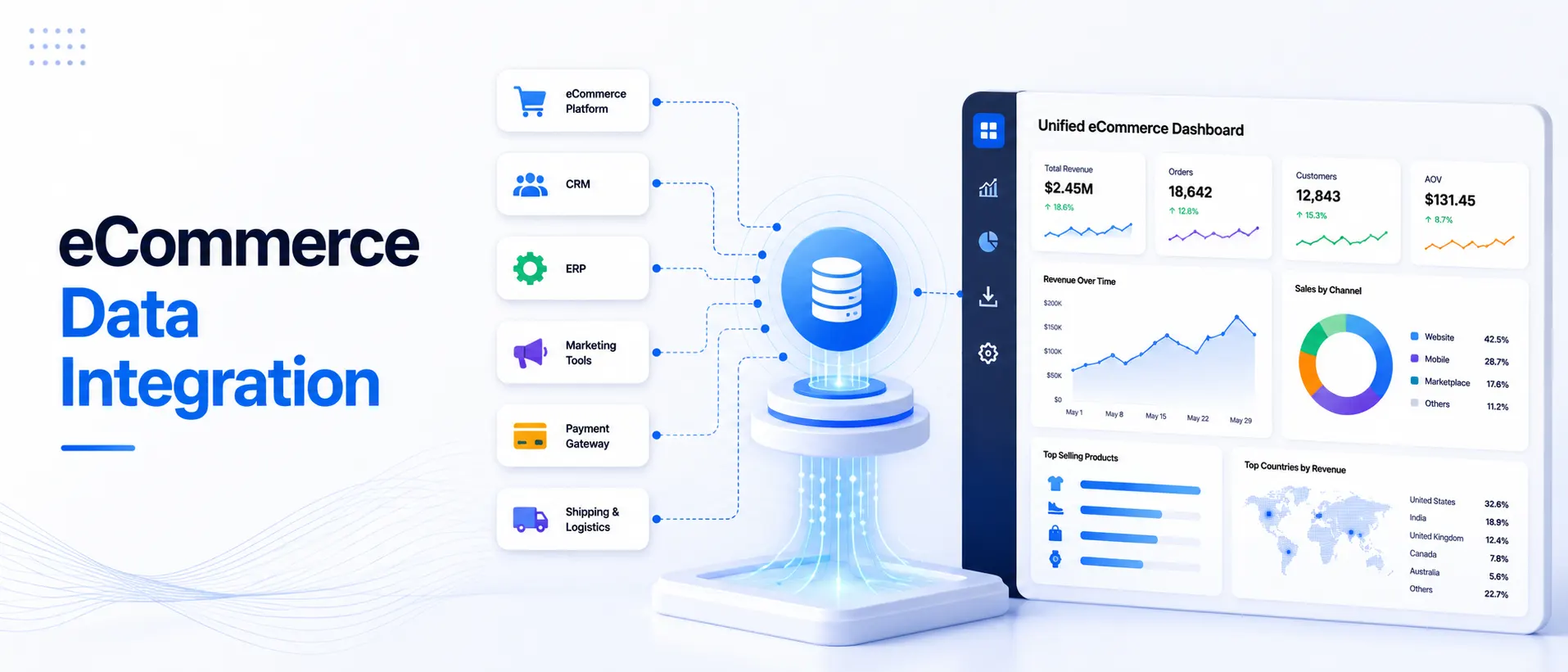
Consider unified eCommerce data architecture in three layers:
- The Source Layer: All the platforms generating your data (ad networks, store platform, email tool, CRM, etc.).
- The Integration Layer: The middleware or platform used to extract, transform, and load data from all of the sources to a central location. ECommerce data connectors and APIs come into play.
- The Analytics Layer: Where your team has visibility and utilizes the data. This is your ecommerce analytics dashboard, reporting environment, and any AI-powered tools that deliver insights on their own.
Without an integration layer, your analytics remain limited to the data available within individual systems. With it, you’ll have full operational visibility.
What Are the Main Types of eCommerce Data Integration?
eCommerce data integration is the process of consolidating multiple platforms and systems into a single, centralized system to provide a unified view of business operations. It facilitates seamless data integration across your business systems, such as sales, inventory, customer, marketing, and analytics, helping you make informed decisions and streamline your processes. These are some of the most important eCommerce integrations:
1. API-Based Integration
Most modern platforms have APIs, which are standardized interfaces that enable external tools to request and exchange data. An eCommerce API analytics approach involves fetching real-time or near-real-time data from the source system, either via scheduled requests or via events. This approach offers flexibility and access to current data, but it requires ongoing maintenance as APIs change.
2. Native (Pre-Built) Connectors
Many analytics platforms offer ready-to-use connectors for sources such as Shopify, Klaviyo, and Meta Ads. They are simple to set up and deal with API complexity. The price of pre-built connectors is that they don’t necessarily expose all data fields, and they may not be updated as platforms change.
3. ETL / ELT Pipelines
Extract, Transform, Load (ETL) and its more recent cousin, ELT, refer to the process of loading raw data from source systems, transforming it into a usable schema, and storing it in a data warehouse (such as BigQuery or Snowflake). This is the most flexible way to handle complex queries and historical analysis, but it usually requires more technical setup.
4. Reverse ETL
The flip side is moving data from your warehouse to your operational applications. For instance, you can import enriched customer segments from your warehouse to enrich emails you send with Klaviyo.
| Integration Type | Best For | Technical Complexity |
| Native connectors | Quick setup, common sources | Low |
| API-based | Real-time data, custom fields | Medium |
| ETL/ELT pipelines | Deep analysis, warehousing | High |
| Reverse ETL | Activating warehouse data | Medium-High |
What Are the Best Data Integration Tools for eCommerce?
The best data integration solutions for eCommerce depend on your tech stack, team size, and the balance you strike between raw data flexibility and time-to-market.
1. ProactiveAI
ProactiveAI is an AI-powered conversational analytics solution designed for eCommerce. ProactiveAI goes beyond data centralization by enabling teams to ask questions in plain language, receive automated answers, and act directly from the dashboard. More on this below.
2. Fivetran
Highly dependable ELT tool with excellent prebuilt connectors. Best for teams that already have a data warehouse and an analyst familiar with SQL.
3. Segment
A behavioral event data-driven customer data platform. Excellent capability in analyzing user journeys from website and app interactions.
4. Supermetrics
Great for marketing teams, particularly getting ad spend and performance into Google Sheets and Looker Studio.
5. Triple Whale
Solid DTC ecommerce data aggregation and attribution platform that’s built for Shopify.
6. Stitch Data
A lightweight ETL tool for teams that desire data in a warehouse without needing to create pipelines from scratch.
Every tool has pros and cons. Most of them will make it a point to require you to act on the data as soon as you get it. Unlike traditional integration-focused platforms, ProactiveAI combines automated data integration with an intelligent analytics layer. Integration and analysis layers are two different things, and it has both in a single package, plus some other cool features like AI sales forecasting and auto-generated reports.
How Do You Connect Shopify, Meta Ads, Google Ads, and Klaviyo in One Analytics View?
This is the first integration that most DTC eCommerce teams require. Let’s do some quick math:
Step 1: Choose your integration method
Using a platform with native connections, such as ProactiveAI or Triple Whale, is typically quicker than building API connections manually. Fivetran + BigQuery + Looker can be a good route to take if your team has engineering resources and is looking to get analytics from your warehouse first.
Step 2: Connect Shopify
Orders, customers, products, refunds, and more are available via Shopify’s API. The majority of analytics platforms use Shopify’s Admin API or newer GraphQL API to achieve read-only access. Integrating Shopify with analytics is typically the simplest aspect of the connection.
Step 3: Connect your ad platforms
Both Meta Ads and Google Ads have their own marketing APIs. Campaign-level spend, impressions, clicks, and conversions will be desirable. One important question to consider here is whether you rely on each platform’s own conversion attribution or want a neutral third-party attribution model. When you’re trying to determine which channel is actually generating revenue, the answer is crucial.
Step 4: Connect Klaviyo
Klaviyo’s API provides metrics on flow performance, campaign revenue, list growth, and unsubscribe rates. When you tie it in with your Shopify data, you can view the revenues from email as compared to paid channel revenues without switching between different tools.
Step 5: Decide on your single schema
This is where integrating ecommerce platforms analytics becomes more complicated. It’s hard to match revenue from Shopify, Klaviyo, and Meta Ads, as each platform credits revenue differently. With a well-unified analytics layer, you can select your attribution model for each platform rather than go with what they say they use.
Step 6: Create your reporting view
With data centralized, you can create the dashboards and alerts that you actually need: blended ROAS, customer acquisition cost by channel, repeat purchase rate by cohort, and more.
What Are the Best Practices for eCommerce Data Integration?
The best eCommerce data integration requires accurate data mapping, secure connections, and scalable systems to ensure smooth data flow. Adopting best practices enables businesses to ensure data quality, enhance efficiency, and make informed, timely decisions.
1. Standardize naming conventions early
In the end, if Shopify reports “net revenue” and your ad platform reports “purchase value”, then your reports will leave you with a headache until you agree on a common definition for each metric.
2. Automate refresh schedules
Manual data pulls lead to stale reports. Schedule automated syncs, and watch them – broken connectors are frequent, and often only get found out when somebody asks “why do last week’s numbers look different?
3. Build for incrementality
Data refreshes are costly and time-consuming at scale. Use incremental loads to only retrieve the new or modified data.
4. Record your data model
Adding to the stack shouldn’t require anyone to wade through code to figure out what a field is or where it is from. A lot of time is saved with a simple data dictionary.
5. Make investments in data quality checks
What goes in must come out. Write basic validation rules: “total spend should never be zero on an active campaign.
6. Avoid plugging and playing all the components
Work from the top of your product funnel (typically your store platform and your best ad channel) outwards. It is typically very difficult to get all 15 sources working at start-up.
How Do You Choose the Right Integration Platform?
Before selecting a platform for your ecommerce data integration, here are a few questions that you should know to be answered:
1. Does it support your specific sources?
A connector library that doesn’t integrate with your email platform or inventory system is only half the solution.
2. How fresh is the data?
Ecommerce businesses cannot rely on day-old data. See if it updates on an hourly, daily, or real-time basis.
3. What happens when a connector breaks?
This often occurs more than vendors acknowledge. Inquire about alerting, error logging, and speed of issue resolution.
4. Can your team actually use it?
An in-house solution that demands SQL skills is only beneficial if you have someone in your business with these skills and the time to implement them. This is where self-service analytics comes in handy, as it provides a platform that lets your marketing manager create reports without relying on a data analyst.
5. Does it support your analytics layer too?
Some integration tools simply transfer data. Other companies, such as ProactiveAI, integrate an intelligent analytics layer that provides insights without having to wonder what to do next, such as predictive analytics for sales.
6. What’s the actual total cost?
There are platforms that charge per connector, per row synced, or per query. Commit to a model usage beforehand.
Conclusion
eCommerce data integration is no longer a luxury a brand can afford if they wish to scale efficiently. When store, advertising, marketing, CRM, inventory, and analytics data remain isolated, teams miss growth opportunities and make slower decisions.
A single view of analytics combines all your data in one place to better understand what’s driving revenue, which channels are performing best, and where growth opportunities lie. But rather than spending hours gathering reports, businesses can be empowered to act on accurate, real-time insights.
The best way to integrate will vary based on your objectives, technical needs, and business complexity. Teams can use APIs, native connectors, or ETL pipelines to establish a unified data foundation, then apply AI-driven analytics to turn that data into insights.
In the ever-changing landscape of eCommerce, those who manage to convert data into actionable insights will be at a competitive edge. You can make quicker decisions, enhance customer experiences, and establish a more robust foundation for sustainable growth by integrating your tools and leveraging intelligent analytics.
Frequently Asked Questions
What is eCommerce data integration and why does it matter?
eCommerce data integration syncs data from your store, ad platforms, email tools, and other systems into a single source of truth. It’s important because when data is not unified, slow decisions, incorrect attribution, and lost revenue opportunities are the result, which an integrated view would see right away.
What are the most common data silos in eCommerce businesses?
The most frequently mentioned silos include storefront platforms (Shopify, WooCommerce), paid ad networks (Meta, Google), email marketing software (Klaviyo), CRM, inventory and fulfillment software, and web analytics software, none of which offer any visibility between platforms.
How do you connect Shopify, Meta Ads, Google Ads, and Klaviyo in one analytics view?
For each source, use native connectors; define your revenue and attribution numbers consistently across platforms; and, on top of that, create unified dashboards. Applications such as ProactiveAI handle the connection and the analytics layer, so you’re not actually putting it together yourself.
What is the difference between API-based and native integration in eCommerce analytics?
API integration provides real-time access to source data and is highly flexible, but it also requires ongoing technical maintenance. Native integrations are prebuilt components that eliminate trouble for you, but in exchange for less flexibility, they handle the complexities, which means there will be less maintenance overhead and quicker setup time.
How long does it typically take to integrate an eCommerce analytics platform?
Simple integration of core sources (store, ad platforms, email) can go live in just a couple of hours to a few days with native connectors and a platform like ProactiveAI. It usually takes 2–4 weeks for complex setups with custom data sources, migrations to a warehouse, or data transformation.
You might also like
Handpicked articles for your reading list.


Get the latest insights on Conversational AI
Stay ahead of the curve with weekly updates on data analytics, AI trends, and eCommerce growth strategies delivered straight to your inbox.
Join 5,000+ industry leaders. Zero spam, just pure insights.